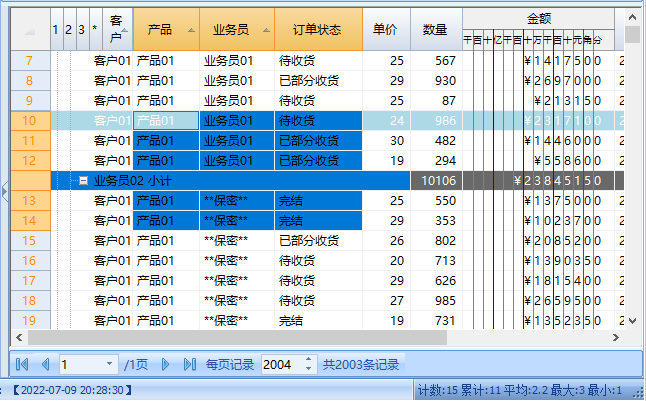
选择
| 属性名称 | 分类 | 是否常用 | 说明 |
| BottomPosition | 选择 | 是 | 返回选定区域的最后一个数据行的位置,此属性在计算的时候,均不包括分组行。 |
| BottomRow | 选择 | 是 | 获取可滚动区域中最后可见的行。 |
| Col | 选择 | 是 | 获取或设置包含游标的列。 |
| ColSel | 选择 | 是 | 获取或设置当前选择中的最后一列。 |
| ContextMenuCol | 选择 | 是 | 返回弹出右键菜单的弹出列位置。 |
| CurrentHighLightRow | 选择 | 是 | 当前高亮行号。 |
| Current | 选择 | 是 | 返回当前表的当前行。 |
| CursorCell | 选择 | 是 | 获取CellRange对象,该对象包含坐标行Col处的单元格。 |
| LastBindingRowIndex | 选择 | 是 | 最后一行绑定行的序号。在一些想通过BaseGrid遍历数据的场景可能会用到。 |
| LeftCol | 选择 | 是 | 获取或设置可滚动区域中的第一个可见列。 |
| MouseCol | 选择 | 是 | 获取光标下列的索引。 |
| MouseRow | 选择 | 是 | 获取光标下的行的索引。 |
| Position | 选择 | 是 | 获得或设置表当前行的序号。主要是用户定位到指定行。如果设置的位置小于0或大于数据最大索引,则按0或最大索引执行定位。 |
| RightCol | 选择 | 是 | 获取可滚动区域中最后一个可见列。 |
| Row | 选择 | 是 | 获取或设置包含光标的行。 |
| RowSel | 选择 | 是 | 获取或设置当前选择中的最后一行。 |
| Selection | 选择 | 是 | 获取规范化形式的选定范围。 |
| SelectionMode | 选择 | 是 | 获取或设置网格的选择行为。 |
| TopPosition | 选择 | 是 | 返回选定区域的第一个绑定数据行的位置,此属性在计算的时候,均不包括分组行。 |
| TopRow | 选择 | 是 | 获取或设置可滚动区域中的第一个可见行。 |
我们设计一个测试这些属性的代码。下面的代码可以直接放到命令窗口中执行。
| Vb.Net |
Dim tbl As SmGrid=Proj.CurrentSmGrid Proj.MsgDebug.Add("Col:{0}",tbl.Col) Proj.MsgDebug.Add("Row:{0}",tbl.Row) Proj.MsgDebug.Add("ColSel:{0}",tbl.ColSel) Proj.MsgDebug.Add("RowSel:{0}",tbl.RowSel) Proj.MsgDebug.Add("CursorCell.c1:{0}",tbl.CursorCell.c1) Proj.MsgDebug.Add("CursorCell.r1:{0}",tbl.CursorCell.r1) Proj.MsgDebug.Add("LastBindingRowIndex:{0}",tbl.LastBindingRowIndex) Proj.MsgDebug.Add("LeftCol:{0}",tbl.LeftCol) Proj.MsgDebug.Add("RightCol:{0}",tbl.RightCol) Proj.MsgDebug.Add("TopRow:{0}",tbl.TopRow) Proj.MsgDebug.Add("BottomRow:{0}",tbl.BottomRow) Proj.MsgDebug.Add("MouseCol:{0}",tbl.MouseCol) Proj.MsgDebug.Add("MouseRow:{0}",tbl.MouseRow) Proj.MsgDebug.Add("Position:{0}",tbl.Position) Proj.MsgDebug.Add("TopPosition:{0}",tbl.TopPosition) Proj.MsgDebug.Add("BottomPosition:{0}",tbl.BottomPosition) Proj.MsgDebug.Add("SelectionMode:{0}",tbl.SelectionMode.ToString()) Proj.MsgDebug.Add("CurrentHighLightRow:{0}",tbl.CurrentHighLightRow) Proj.MsgDebug.Add("Current.Index:{0}",tbl.Current.Index) Proj.MsgDebug.Add("ContextMenuCol:{0}",tbl.ContextMenuCol) Proj.MsgDebug.Add("Selection.r1:{0}",tbl.Selection.r1) Proj.MsgDebug.Add("Selection.r2:{0}",tbl.Selection.r2) Proj.MsgDebug.Add("Selection.c1:{0}",tbl.Selection.c1) Proj.MsgDebug.Add("Selection.c2:{0}",tbl.Selection.c2) Proj.MsgDebug.Add("Selection.BottomRow:{0}",tbl.Selection.BottomRow) Proj.MsgDebug.Add("Selection.TopRow:{0}",tbl.Selection.TopRow) Proj.MsgDebug.Add("Selection.LeftCol:{0}",tbl.Selection.LeftCol) Proj.MsgDebug.Add("Selection.RightCol:{0}",tbl.Selection.RightCol) Proj.MsgDebug.Add("Selection.IsSingleCell:{0}",tbl.Selection.IsSingleCell) |
| C# |
SmGrid tbl = Proj.CurrentSmGrid; Proj.MsgDebug.Add("Col:{0}", tbl.Col); Proj.MsgDebug.Add("Row:{0}", tbl.Row); Proj.MsgDebug.Add("ColSel:{0}", tbl.ColSel); Proj.MsgDebug.Add("RowSel:{0}", tbl.RowSel); Proj.MsgDebug.Add("CursorCell.c1:{0}", tbl.CursorCell.c1); Proj.MsgDebug.Add("CursorCell.r1:{0}", tbl.CursorCell.r1); Proj.MsgDebug.Add("LastBindingRowIndex:{0}", tbl.LastBindingRowIndex); Proj.MsgDebug.Add("LeftCol:{0}", tbl.LeftCol); Proj.MsgDebug.Add("RightCol:{0}", tbl.RightCol); Proj.MsgDebug.Add("TopRow:{0}", tbl.TopRow); Proj.MsgDebug.Add("BottomRow:{0}", tbl.BottomRow); Proj.MsgDebug.Add("MouseCol:{0}", tbl.MouseCol); Proj.MsgDebug.Add("MouseRow:{0}", tbl.MouseRow); Proj.MsgDebug.Add("Position:{0}", tbl.Position); Proj.MsgDebug.Add("TopPosition:{0}", tbl.TopPosition); Proj.MsgDebug.Add("BottomPosition:{0}", tbl.BottomPosition); Proj.MsgDebug.Add("SelectionMode:{0}", tbl.SelectionMode.ToString()); Proj.MsgDebug.Add("CurrentHighLightRow:{0}", tbl.CurrentHighLightRow); Proj.MsgDebug.Add("Current.Index:{0}", tbl.Current.Index); Proj.MsgDebug.Add("ContextMenuCol:{0}", tbl.ContextMenuCol); Proj.MsgDebug.Add("Selection.r1:{0}", tbl.Selection.r1); Proj.MsgDebug.Add("Selection.r2:{0}", tbl.Selection.r2); Proj.MsgDebug.Add("Selection.c1:{0}", tbl.Selection.c1); Proj.MsgDebug.Add("Selection.c2:{0}", tbl.Selection.c2); Proj.MsgDebug.Add("Selection.BottomRow:{0}", tbl.Selection.BottomRow); Proj.MsgDebug.Add("Selection.TopRow:{0}", tbl.Selection.TopRow); Proj.MsgDebug.Add("Selection.LeftCol:{0}", tbl.Selection.LeftCol); Proj.MsgDebug.Add("Selection.RightCol:{0}", tbl.Selection.RightCol); Proj.MsgDebug.Add("Selection.IsSingleCell:{0}", tbl.Selection.IsSingleCell); |
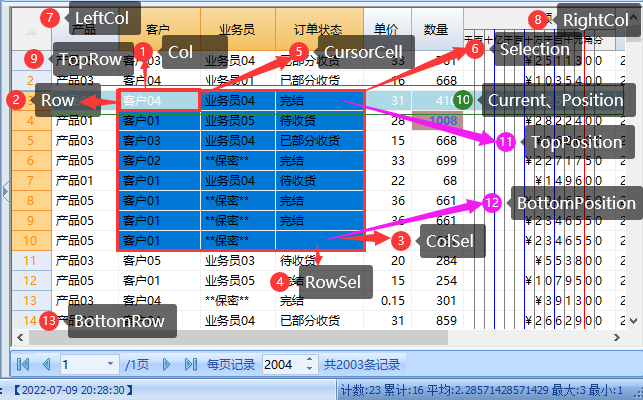
上面这张选择标识了绝大多数属性表示的内容。运行后各属性的结果如下:
'返回结果:Col:2 '返回结果:Row:3 '返回结果:ColSel:4 '返回结果:RowSel:10 '返回结果:CursorCell.c1:2 '返回结果:CursorCell.r1:3 '返回结果:LastBindingRowIndex:2003 '返回结果:LeftCol:1 '返回结果:RightCol:8 '返回结果:TopRow:1 '返回结果:BottomRow:14 '返回结果:MouseCol:-1 '返回结果:MouseRow:-1 '返回结果:Position:2 '返回结果:TopPosition:2 '返回结果:BottomPosition:9 '返回结果:SelectionMode:Default '返回结果:CurrentHighLightRow:3 '返回结果:Current.Index:3 '返回结果:ContextMenuCol:6 '返回结果:Selection.r1:3 '返回结果:Selection.r2:10 '返回结果:Selection.c1:2 '返回结果:Selection.c2:4 '返回结果:Selection.BottomRow:10 '返回结果:Selection.TopRow:3 '返回结果:Selection.LeftCol:2 '返回结果:Selection.RightCol:4 '返回结果:Selection.IsSingleCell:False |
我们再来看一个选择区返回的结果。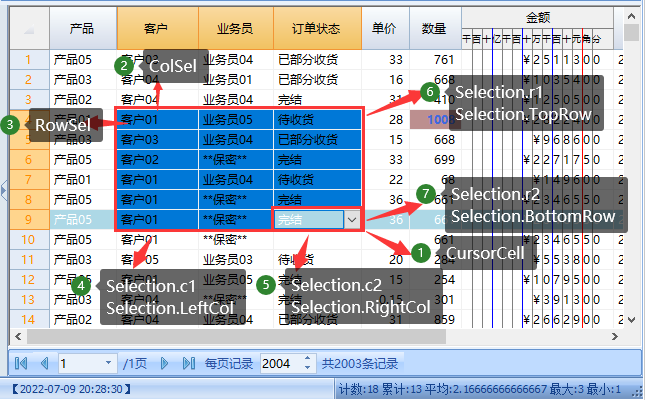
'返回结果:Col:4 '返回结果:Row:9 '返回结果:ColSel:2 '返回结果:RowSel:4 '返回结果:CursorCell.c1:4 '返回结果:CursorCell.r1:9 '返回结果:LastBindingRowIndex:2003 '返回结果:LeftCol:1 '返回结果:RightCol:8 '返回结果:TopRow:1 '返回结果:BottomRow:14 '返回结果:MouseCol:-1 '返回结果:MouseRow:-1 '返回结果:Position:8 '返回结果:TopPosition:3 '返回结果:BottomPosition:8 '返回结果:SelectionMode:Default '返回结果:CurrentHighLightRow:9 '返回结果:Current.Index:9 '返回结果:ContextMenuCol:6 '返回结果:Selection.r1:4 '返回结果:Selection.r2:9 '返回结果:Selection.c1:2 '返回结果:Selection.c2:4 '返回结果:Selection.BottomRow:9 '返回结果:Selection.TopRow:4 '返回结果:Selection.LeftCol:2 '返回结果:Selection.RightCol:4 '返回结果:Selection.IsSingleCell:False |
我们会发现下面几个规律:
1、ColSel与Col之间没有确定的关系。ColSel既可以大于Col,也可以小于Col,甚至可以等于Col。这取决于鼠标点击单元格之后往哪个方向拖动。鼠标拖动的最后落点为ColSel和RowSel的单元格。
2、Selection中r1<r2,c1<c2,分别对应TopRow、BottomRow、LeftCol、RightCol。大小确定,我们遍历的时候就方便多了。
3、当我们在有合计、分类汇总等非绑定行介入时,我们可以看到TopPosition、BottomPosition更适合循环遍历绑定数据行。
4、LeftCol和TopRow方便我们定位显示的数据位置。
5、CursorCell.r1=Current.Index=CurrentHighLightRow
如果想通过代码来设置或获得选择范围的,可以参考“定位”。